

In an era where data is the heart of driving business, making Data-Driven Decisions is no longer just an option; it is the key to success and a competitive advantage. Having a tool that helps you deeply understand your customers and business performance is therefore essential, and Google Analytics 4, or GA4 for short, is that answer.
Consider this: if you make a business decision without any data to analyze first, what do you think the outcome of that guesswork-based decision will be?
This article will introduce what GA4 is and how it is beneficial for doing business in the digital age, so that business owners, marketers, or anyone interested can build upon this understanding.
1. What Is Google Analytics 4 (GA4)?
Google Analytics 4 (GA4) is a tool from Google that collects data and statistics from visitors to a website or application in various formats. Google Analytics 4 is also available for you to use completely free of charge, without costing even a single baht. However, you must install this tool after you have a website or have created an application.
Google Analytics 4 is also designed and built to meet future measurement needs by changing the data collection perspective from the previous version (Universal Analytics or UA), which focused on counting sessions (Session-based), to collecting all data based on events (Event-based).
In Google Analytics 4 (GA4), the word “Event” has a very important meaning. To put it simply, an Event in GA4 is every action or interaction a user performs on your website or application.
Whatever the user does, from basic things to specific actions, GA4 records it all as an “Event.” For example:
- Viewing a web page (page_view)
- Scrolling the screen down 90% (scroll)
- Clicking an outbound link (click)
- Watching a video (video_start, video_progress)
- Downloading a file (file_download)
- Making a purchase (purchase)
2. Types Of "Events" In GA4
Events in GA4 are divided into 4 main types to make them easy to use.
- Automatically collected events: These are basic events that GA4 will collect for you immediately after you install the tracking code, without requiring any additional setup. Examples include session_start (starting a new session), first_visit (the first visit), and page_view (viewing a web page).
- Enhanced measurement events: These are common user actions on a website for which you can easily enable or disable data collection by simply toggling a switch in the GA4 settings page, without having to touch any code at all. Examples include scroll, click (outbound clicks), file_download, and video_progress.
- Recommended events: These are events for which Google has already created standardized names and structures, grouped by business type. For example, an e-commerce business would have recommended events like add_to_cart, begin_checkout, and purchase. Using the names Google recommends helps standardize your reporting and better leverage GA4's Machine Learning features.
- Custom events: These are events that you create and name yourself to measure specific actions that are highly unique to your business and are not covered by the three types above. For example, clicking a "Compare Products" button or filling out a specific form that doesn't directly generate a lead.
3. Examples Of How To Use Google Analytics 4
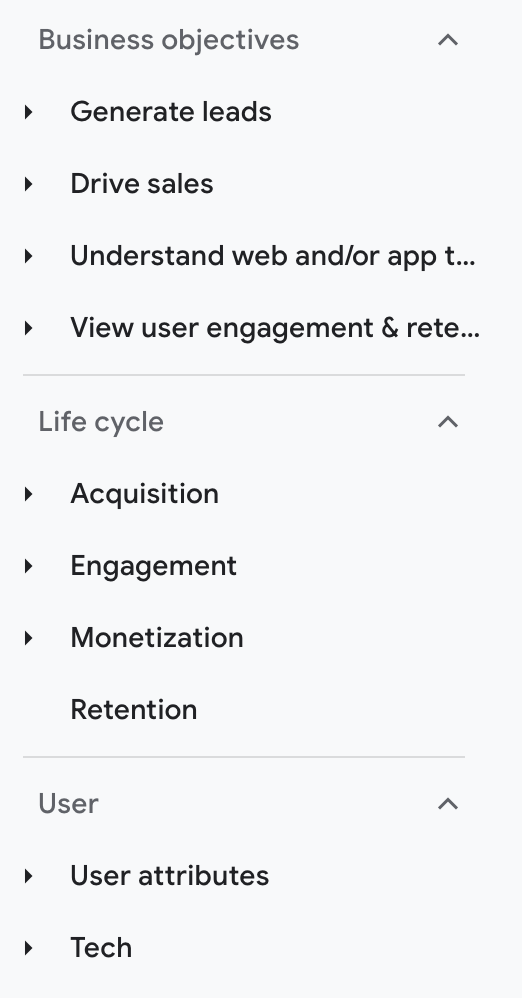
The image below shows the various menu bars in the ‘Report’ section, where data and statistics are stored, ready for you to analyze.
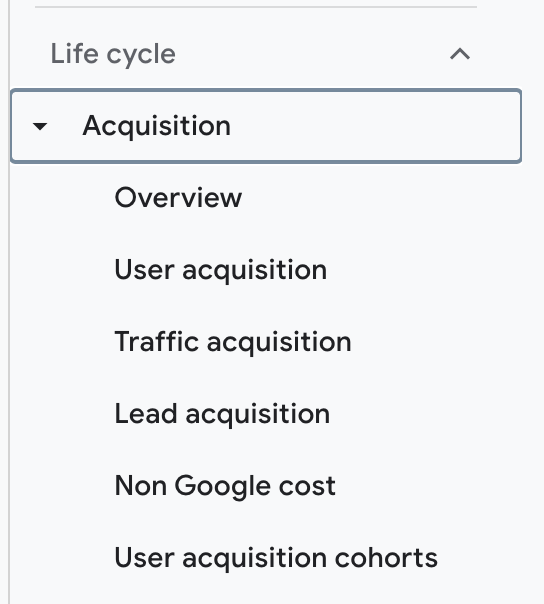
For example, in the Acquisition (visitor source) report menu, when you click on it, you will find various sub-menus (image below).
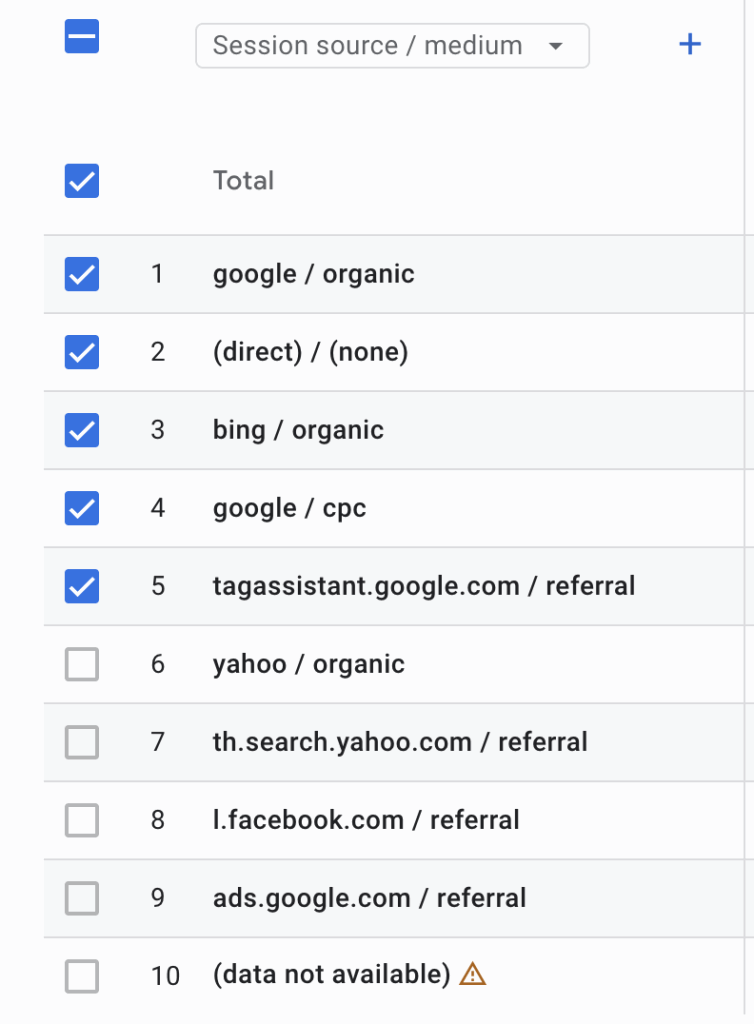
This menu tab (image below) shows you that you can view a report about the “details of website visitor (traffic) sources” and where they come from.
4. Processing And Reporting
When the measurement code collects data, it packages that data and sends it to Google Analytics 4 to be processed into reports. As Analytics processes the data, it aggregates and organizes it based on specific criteria, such as whether the user’s device is mobile or desktop, or the browser they are using.
However, there are also configuration settings that allow you to customize how that data is processed. For example, you might want to use a filter to ensure your data does not include internal company traffic or traffic from people within the organization—in simple terms, excluding the IP addresses of devices that GA4 might otherwise collect data from.
Once Analytics finishes processing the data, it is stored in a database where it cannot be changed. Therefore, remember that when you set up your configuration, do not exclude any data you think you might want to analyze later.
After the data is processed and stored in the database, it will appear in Google Analytics in the form of reports.
5. Why Your Business Needs To Use Google Analytics 4 (GA4)?
Google Analytics 4 is not just an ordinary data collection tool; it collects data for analysts to build upon in planning marketing for business growth. And here are the main benefits your business will receive from using the GA4 analysis tool.
5.1 Understand Customer Behavior
In the past, if the same customer visited your website via a computer and then returned to purchase through a mobile application, older analytics systems might see them as two different people.
However, Google Analytics 4 is specifically designed to solve this problem. It can consolidate data from both websites and applications into one place, giving you a clear picture of the entire customer journey from start to finish. This helps you understand true customer behavior and needs more deeply.
5.2 Works With Google Ads
For businesses that market through Google Ads, using GA4 will help take advertising performance to the next level. You can create audiences based on various behaviors that occur on your website or app, such as people who have purchased products or people who are likely to purchase in the future. You can then use these audiences directly for advertising in Google Ads, allowing your ads to reach the right people more effectively and measure your return on investment (ROI) more accurately than before.
5.3 It Can Be Used To Further Enhance SEO
In Google Analytics 4 reports, there is a section that tells you how visitors behave on your website. In other words, you can know which pages visitors like, what their behavior is, how long they stay on that page, whether they have a high Engagement Rate, or even if they have a high Bounce Rate (leaving the page immediately).
Once you have this data, especially knowing which website pages resonate most with visitors, you can pull this analysis to further your marketing efforts, such as SEO, for example.
For instance, if an article about health has high traffic and a low Bounce Rate, you can interpret that your visitors like this type of content. You can then create more content of this nature for SEO.
5.4 It Has Flexible And Easily Customizable Reports
Forget about rigid, traditional reports. GA4 comes with a tool called “Explorations,” which is like a whiteboard where you can freely drag and drop various data points to create reports and data analysis from the perspective you need.
Whether it’s Funnel analysis, Path exploration, or creating complex audience segments, it helps you discover new business opportunities that might be hidden in the data more easily.
5.5 It Is Designed To Respect Privacy
Currently, the world is placing increasing importance on user Data Privacy. The use of cookies to track users is becoming more restricted. Google Analytics 4 was therefore designed to operate with less reliance on cookies, using Machine Learning to help fill in data that may be missing. This ensures that measurement remains accurate while still respecting user privacy rights, which is crucial for a business’s image and credibility.
Frequently Asked Questions (FAQ)
- If your website is built with WordPress, I recommend installing GA4 using the following method:
Step 1: Create and copy the Measurement ID from Google Analytics 4Before you can install it on your site, you need a tracking “code” from our GA4 account, which is called the Measurement ID.
– Sign in to Google Analytics: Go to analytics.google.com and sign in with your Google account. Go to the Admin section: Click the gear icon in the bottom-left corner.
– Select the correct Property: In the “Property” column, make sure you have selected the GA4 Property you want to connect to your WordPress website.
– Go to Data Streams: Click on the Data Streams menu.
– Select your web data stream: Click on the name of the website data stream you created. (If you don’t have one yet, click “Add stream” > “Web” and fill in your website’s information.)
– Copy the Measurement ID: On the stream details page, you will see the Measurement ID, which has the format G-XXXXXXXXXX. Copy this ID and save it, as this is what we will need in the next step.
Step 2: Install GA4 on WordPress via the “Site Kit by Google” Plug-in
– This is the best method for most users because it is the official plugin from Google itself, making the connection easy and secure. You don’t have to touch a single line of code.
– Log in to your WordPress dashboard: Go to yourwebsite.com/wp-admin
– Go to the Plugins menu: Click on Plugins > Add New.
– Search for Site Kit: In the search box, type “Site Kit by Google”.
– Install and Activate: When you find the plugin, click Install Now, and then click Activate.
– Set up GA4: Click on Site Kit in your WordPress dashboard and install the GA4 tool according to the on-screen instructions.
- If your website is custom-coded, I recommend contacting your Web Developer for the installation.
Because the data available in GA4 is so diverse, you can use this analysis to market in various areas as follows:
- Gaining Deep Customer Insight Before you can do good marketing, you must first understand who your customers are. GA4 helps us see a much clearer picture of our customers.
- Campaign Optimization GA4 is an excellent measurement tool that helps us know whether the marketing campaigns we run are worthwhile.
- Website & Content Strategy Improvement Data from GA4 can tell us which content or website sections need improvement.
- Directly Driving Sales & Conversion GA4 is specifically designed to measure business outcomes.
Conclusion
Google Analytics 4 is not just an ordinary tool for viewing website visitor statistics; it is an intelligent data analysis platform that is essential for businesses of all sizes in the digital age.
Switching to GA4 opens the door to a world of insights that will help you understand your customers better, make sharper business decisions, and create sustainable, long-term growth.
If you haven’t started using GA4 yet, now is the time to start learning about and installing the GA4 analysis tool so you don’t miss out on the critical opportunity to drive your business forward with the power of data.



Such an interesting and clear blog post about nowadays SEO. You think that the algorithm will rapidly change from now on? 😗
Oh yeah! AI is coming fast as a game changer. We can’t rely solely on traditional SEO as Answer Engine Optimization (AEO) plays a significant role in this game. SEO will become harder and harder.
I see now. Anyone can comment and post their thoughts about the article. That’s cool man, keep it up! 👍🏼
Yeah, it’s convenient to engage now in the community. 😍